What Are Bridges?
Bridges connect Tempreon to your AI tools — Claude, Cursor, and more. Here's how they work.
Ready to connect? Your Bridges page walks you through it step by step.
Open your Bridges pageBridges Connect Your Intelligence to Your AI
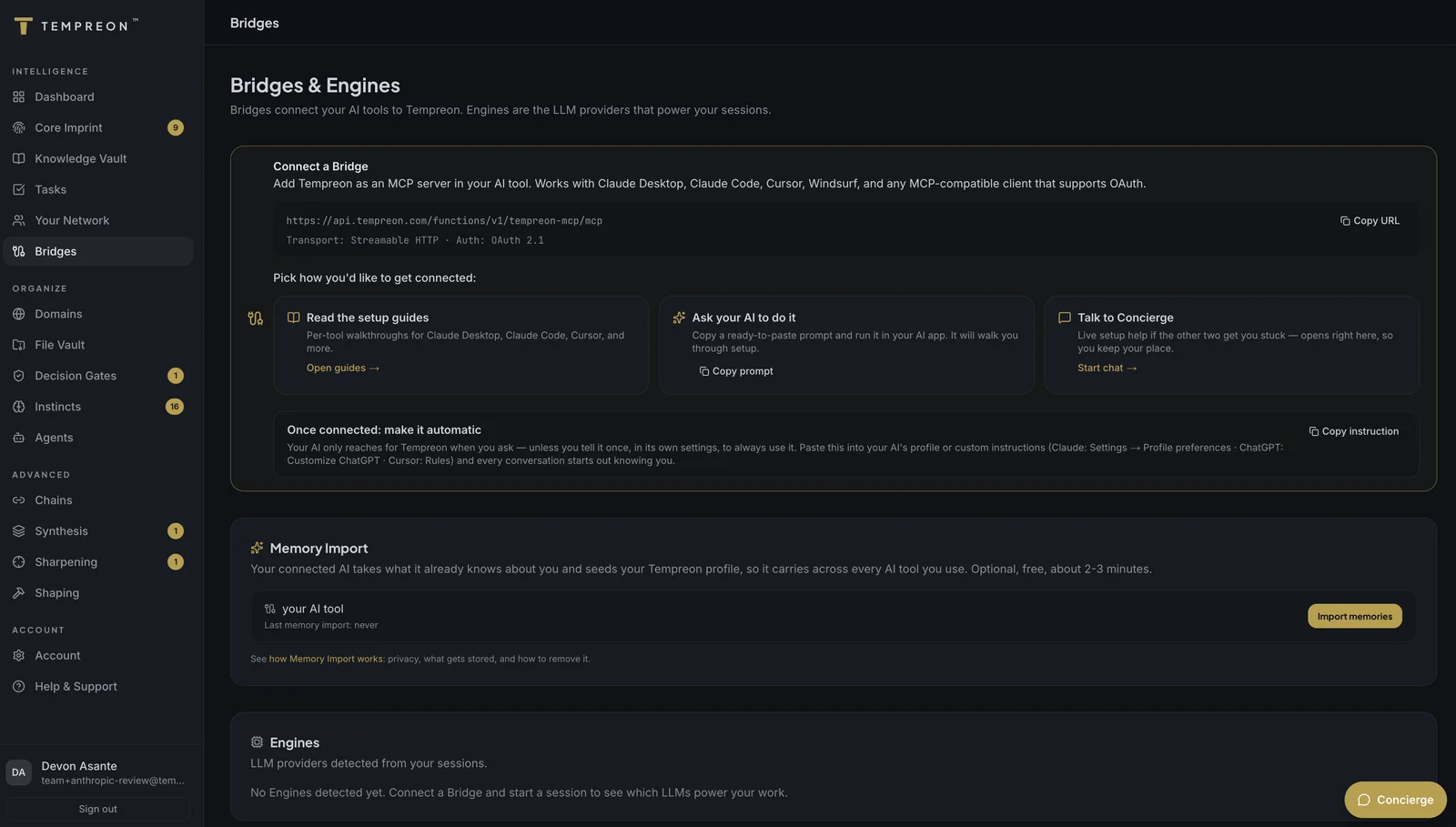
A Bridge is a live connection between Tempreon and an AI tool you use. When a Bridge is active, your AI tool can access your Core Imprint, Knowledge Vault, Instincts, and everything else Tempreon holds about you.
Without a Bridge, Tempreon is just a dashboard. With a Bridge, your AI becomes genuinely personal.
How Bridges Work
Bridges use the Model Context Protocol (MCP) — an open standard for connecting AI tools to external context sources. Here's the flow:
- You add Tempreon as a connection in your AI tool's settings
- When you start a session, your AI tool contacts Tempreon through the Bridge
- Tempreon authenticates the connection using your account credentials
- Your relevant intelligence is loaded into the session — Core Imprint, knowledge, preferences, and context
- As you work, Tempreon captures new knowledge and patterns in the background
The connection is secure, encrypted, and scoped to your account. Nobody else can access your data through a Bridge.
Supported Platforms
Tempreon connects through the Model Context Protocol (MCP) — and any AI tool that supports adding custom remote MCP servers with OAuth can connect. These are the clients with dedicated setup guides:
| Platform | Type | Guide |
|---|---|---|
| Claude (web, desktop, mobile) | AI assistant — every plan, including Free. Listed in Anthropic's connectors directory, so it connects without pasting a URL | Claude setup guide |
| Claude Code | Terminal agent | Claude Code setup guide |
| ChatGPT | AI assistant (developer mode) | ChatGPT setup guide |
| Codex | Terminal agent, IDE extension, desktop app | Codex setup guide |
| Gemini (app, custom apps) | AI assistant | Gemini setup guide |
| Google Antigravity | Agentic IDE + CLI | Antigravity setup guide |
| Gemini CLI | Terminal agent | Gemini CLI setup guide |
| Cursor | Code editor | Cursor setup guide |
| VS Code (GitHub Copilot) + Visual Studio | Code editor / IDE | VS Code setup guide |
| Windsurf (Devin Desktop) | Code editor | Windsurf setup guide |
| Zed | Code editor | Zed setup guide |
| JetBrains IDEs (+ Junie) | IDEs | JetBrains setup guide |
| Cline | VS Code extension | Cline setup guide |
| Kiro | Agentic IDE (AWS) | Kiro setup guide |
| Perplexity | AI assistant (multi-model) | Perplexity setup guide |
| Vibe (Mistral, formerly Le Chat) | AI assistant | Vibe setup guide |
| Grok (xAI) | AI assistant | Grok setup guide |
| Raycast | Launcher AI (macOS, Windows, iOS) | Raycast setup guide |
| Warp | Terminal | Warp setup guide |
| OpenCode | Terminal agent (75+ model providers) | OpenCode setup guide |
| Qwen Code | Terminal agent | Qwen Code setup guide |
| Kimi (Kimi Code CLI, Claude Code route) | Open model | Kimi setup guide |
| GLM (Z.ai in Claude Code and more) | Open model | GLM setup guide |
| LM Studio | Local models, desktop app | LM Studio setup guide |
| Open WebUI, LibreChat, Goose, and more | Open-source clients | Open-source client guides |
| Anything else that speaks MCP | Varies | Universal MCP guide |
The coverage principle: if a client supports custom remote MCP servers with OAuth, Tempreon works with it — the guides above are conveniences for the most common clients, not the outer limit. Using something we haven't documented? The universal guide covers the pattern, and let us know so we can add a guide.
What Your Bridge Enables
Once connected, your AI has access to Tempreon's full toolset. Depending on your subscription tier, this includes:
- Core Imprint access — Your AI reads your identity and adapts its style
- Knowledge search — Your AI can query your stored knowledge base
- Knowledge capture — Tell your AI to remember something and it's stored for future sessions
- Task management — Create, update, and track tasks through natural conversation
- File storage — Save and retrieve documents across sessions
- Network intelligence — Query your stored contact and relationship data
- Learning — Your session patterns feed the Tempering system, making your AI smarter over time
Higher tiers unlock additional capabilities like Agents (AI personalities), Chains (multi-step orchestration), and Decision Gates (behavioral rules).
Bridge Limits by Tier
Your subscription determines how many simultaneous Bridges you can maintain:
| Tier | Bridge Limit |
|---|---|
| Free | 1 Bridge |
| Standard | 5 Bridges |
| Premium | Unlimited |
| Enterprise | Unlimited |
Setup Guides
Every platform in the table above has its own step-by-step guide — pick your client and follow along. The most popular starting points:
- Connect Claude to Tempreon — web, desktop, and mobile, on every plan
- Connect Claude Code to Tempreon — the terminal agent
- Connect ChatGPT to Tempreon — via developer mode
- Connect Cursor to Tempreon — MCP settings in the editor
Using something we haven't documented? The universal MCP client guide covers the OAuth pattern that works with any MCP-capable tool — and tell us about it so we can add a dedicated guide.
Try Saying...
Once your Bridge is active, your AI knows about the connection. Try:
- "What's my current session context?" — See what Tempreon has loaded
- "Start my session for content writing" — Initialize with task-specific context
- "What tools do you have access to through Tempreon?" — See available capabilities
Use Case: One Intelligence, Multiple Tools
Alex is a startup CTO who uses Claude Code for development work and Claude Desktop for strategic planning. Both are connected to Tempreon through separate Bridges. When Alex stores a technical decision in a Claude Code session ("Remember: we chose PostgreSQL over MongoDB for the user data store because of ACID compliance requirements"), that knowledge is available in the next Claude Desktop session when drafting the architecture document. No copy-pasting between tools. The intelligence just follows.