Dashboard Overview
Your Tempreon dashboard is the command center for your intelligence layer.
Your Home Base
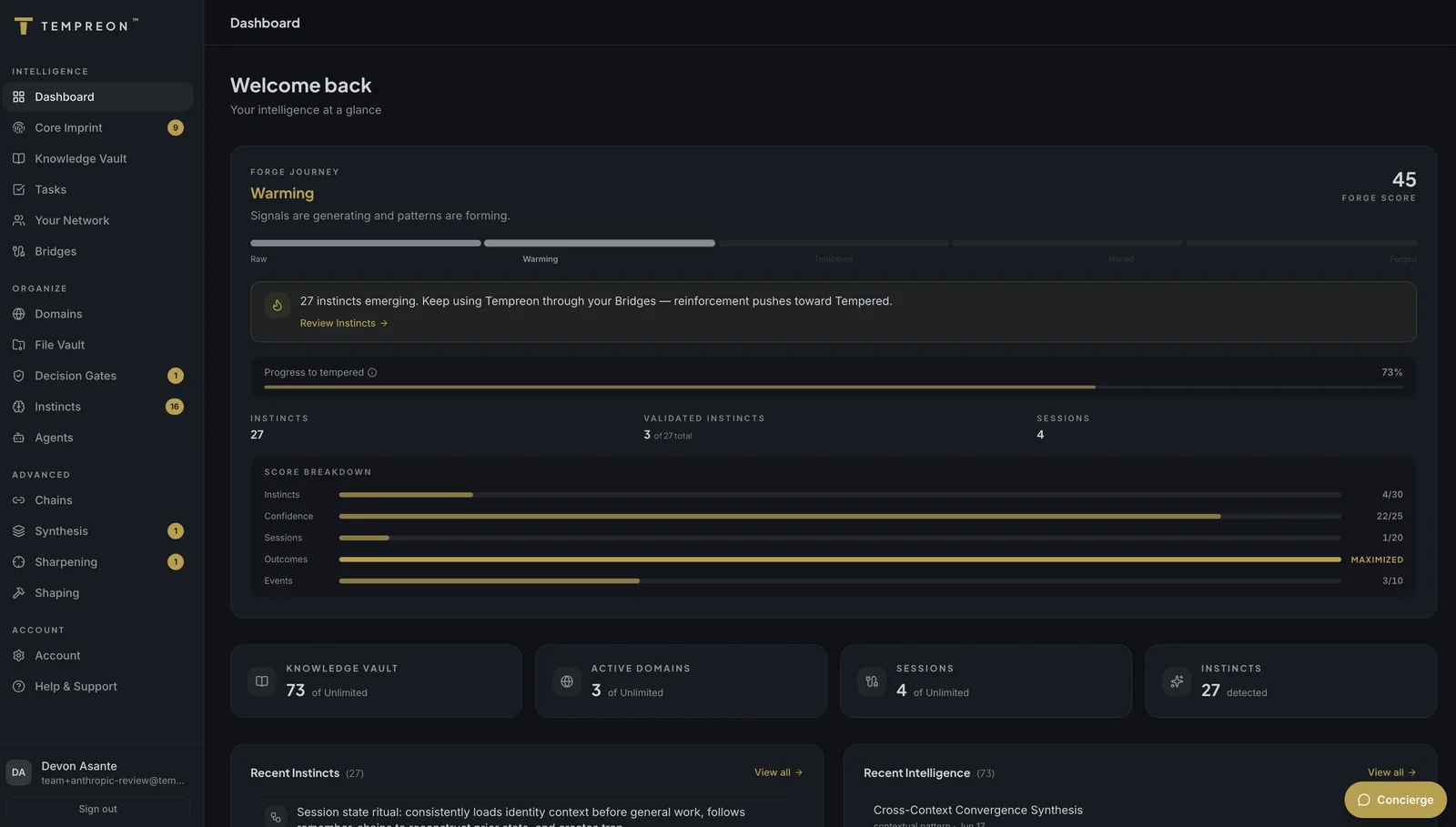
The Tempreon dashboard is where you see everything at a glance — how your AI is learning, what intelligence you've built, and what needs your attention.
What You'll See
Welcome & Forge Journey
At the top, you'll see your current Forge Journey state — a visual indicator of how developed your intelligence layer is. It progresses through five stages:
Raw → Warming → Tempered → Honed → Forged
This isn't just a badge. Each stage reflects real milestones — the number of validated Instincts, session depth, and learning system maturity. More on this in Forge Journey.
Capacity Indicators
Four cards show your current usage:
- Knowledge Vault — How many knowledge records you've stored vs. your tier limit
- Active Domains — How many focus areas you've created
- Bridge Sessions — Total sessions through your connected AI tools
- Instincts Learned — How many behavioral patterns Tempreon has captured
Onboarding Checklist
If you're still getting started, a checklist guides you through the essential setup steps:
- Set up your Core Imprint
- Create your first Domain
- Connect a Bridge
Each item links directly to the relevant page.
Recent Intelligence
A feed showing the most recently captured knowledge records — facts, decisions, and insights your AI has stored from your sessions.
Instinct Feed
Recent patterns the learning system has detected about your style, processes, or decision-making. This gives you a real-time view of what Tempreon is learning about how you work.
Navigation
The sidebar gives you access to everything. Items are organized by function, and some are gated by your subscription tier:
| Section | What It Does | Tier |
|---|---|---|
| Dashboard | Overview and stats | All |
| Core Imprint | Your identity and preferences | Free |
| Knowledge Vault | Stored facts, insights, frameworks | Free |
| File Vault | Documents and deliverables | Standard+ |
| Your Network | People and relationships | Free |
| Domains | Work and life contexts | Standard+ |
| Agents | AI personalities | Premium |
| Instincts | Learned behavioral patterns | Premium |
| Sharpening | Active learning questions | Premium |
| Chains | Multi-step orchestration | Premium |
| Synthesis | Cross-context intelligence | Premium |
| Decision Gates | Behavioral rules | Standard+ |
| Bridges | AI tool connections | Free |
| Settings | Account and subscription | All |
Features on higher tiers are visible but locked — you can see what they do and upgrade when you're ready.
Try Saying...
From any connected AI tool, you can interact with dashboard features conversationally:
- "What's my current Forge status?" — Check your Forge Journey progress
- "How many knowledge records do I have?" — Quick capacity check
- "What did I work on in my last session?" — Load continuation context
- "Show me my active tasks" — Pull up your task queue